










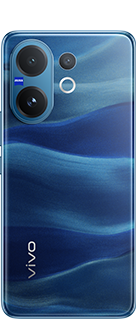











Get the most out of your vivo V40e

Hey vivoicers,
Are you ready to ace your video recording game? The vivo V40e comes equipped with advanced features that make capturing stunning videos a breeze!

Here’s a quick tutorial on how to take full advantage of the Ultra-Stable 4K Video capabilities and crystal-clear HD shots, even when you're on the move.
Step 1:
Start by opening the camera app on your vivo V40e. Make sure you're set to video mode to access all the 4K features.
Step 2:
In the camera settings, choose the 4K video resolution option.
Step 3:
With Hybrid Image Stabilization (OIS+EIS) activated, your videos will be super smooth.
Step 4:
The vivo V40e also supports 4K video recording from the front camera. This means you can create stunning vlogs or share your experiences with friends and followers, showcasing your very own director’s cut.
Step 5:
Once you've captured your masterpiece, you can trim, cut, or enhance your videos to create something truly special.
The vivo V40e makes it easier than ever to create high-quality videos that impress.
By following these simple steps, you can unlock the full potential of Ultra-Stable 4K video and bring your creative vision to life.
Please sign in
Login and share